We measured how URL length changes the QR code on a business card. Encode a 19-character short link instead of a 115-character tracking URL and every dot in the code gets nearly twice as big, in the same space on the card.
A standard European business card is 85 × 55 mm. Once your name, title, phone number and logo are on it, the QR code gets whatever corner is left.
The usual way to fill that corner: copy the page address from the browser, tracking tags and all, paste it into a free QR generator, and shrink the result until it fits. The code looks fine on screen. On paper, every extra character in that address has made the dots smaller.
We wanted to know how much smaller. So we took one shop page and encoded it two ways: its full address with tracking tags (115 characters), and a toa.ee short link that redirects to it (19 characters). Then we measured both codes at the sizes that fit on a business card.
A QR code is a grid, and your URL sets its size
A QR code is a square grid of dark and light dots, called modules. The smallest standard size, version 1, is 21 × 21 modules. Each version adds 4 modules per side, up to version 40 at 177 × 177 (Keyence).
Two things decide which version you get:
How much you encode. Every character of the URL takes space in the grid.
How much error correction you ask for. The four levels let a phone read the code with 7% (L), 15% (M), 25% (Q) or 30% (H) of it damaged or covered. toa.ee and the popular open-source qrcode library use M by default. A logo in the middle needs H, because the logo covers part of the code.
The code also needs a blank margin, the quiet zone, 4 modules wide on every side.
The space on your business card doesn't grow with the URL. More modules in the same square means smaller modules, and small modules are what a phone camera struggles with: at arm's length, in dim light, or on a slightly soft print.
What we measured
In the same printed square, the short link's dots are 1.8 times as wide as the long URL's. Add a logo and the gap grows to nearly 2×: a 29 × 29 grid against 57 × 57.
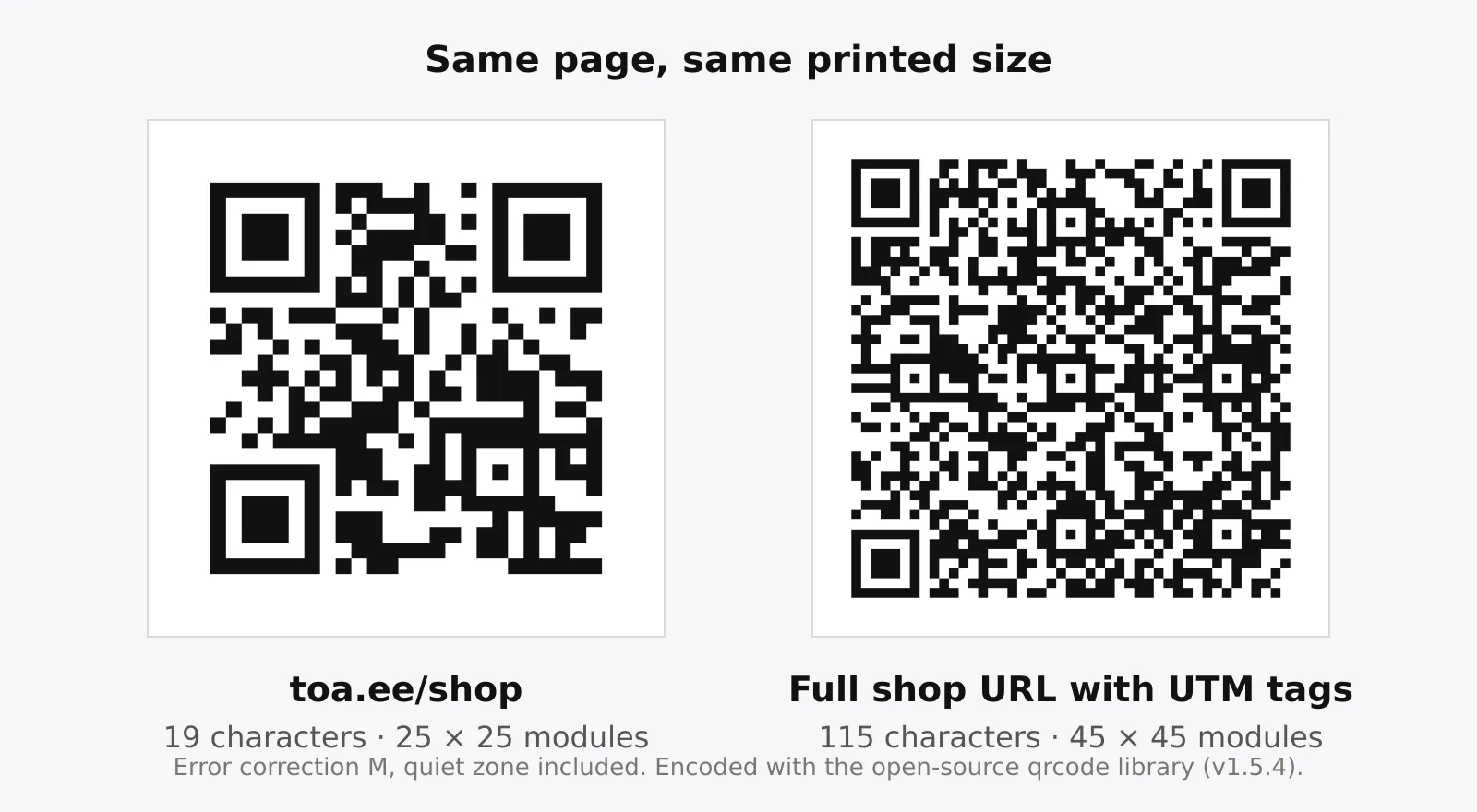
Both codes at the same width, with the same error correction. The long one isn't damaged or blurred: that's simply what 115 characters look like.
Encoded URL | Characters | Error correction | Grid (modules) | 12 mm code | 15 mm code | 20 mm code | 25 mm code |
|---|---|---|---|---|---|---|---|
toa.ee/shop | 19 | M | 25 × 25 | 0.48 | 0.60 | 0.80 | 1.00 |
toa.ee/shop, with logo | 19 | H | 29 × 29 | 0.41 | 0.52 | 0.69 | 0.86 |
Full shop URL | 115 | M | 45 × 45 | 0.27 | 0.33 | 0.44 | 0.56 |
Full shop URL, with logo | 115 | H | 57 × 57 | 0.21 | 0.26 | 0.35 | 0.44 |
Dot width in mm. Code width is the square of dots, not counting the quiet zone around it.
Read the two bold cells. A 12 mm short-link code with a logo has 0.41 mm dots. A 20 mm code of the full URL with a logo has 0.35 mm dots. The smaller code has the bigger dots.
For a reference point: GS1, the standards body behind retail barcodes, sets a minimum dot width of 0.396 mm for QR codes scanned at shop checkouts (GS1 UK). That's a rule for checkout scanners, not phones, but it shows where barcode professionals draw the line. The short link with a logo clears it at 12 mm. The full URL with a logo is still under it at 20 mm.
This isn't special to the word "shop". Any toa.ee link with a name of up to 11 characters fits the 25 × 25 grid, including the random 6-character names on the free plan. With a logo, names of up to 9 characters fit 29 × 29.
Keep the tracking, lose the length
Most of a long URL is tracking. In our example, utm_source=print&utm_medium=business_card&utm_campaign=winter_2026 is 66 of the 115 characters. The other usual extras are share and click IDs copied from the address bar, like fbclid and gclid.
The UTM tags are worth keeping. They're how your analytics tells people who scanned your business card apart from everyone else. Without them, our example page is 48 characters and needs a 33 × 33 grid. That's still 8 more dots per side than the short link, and you've lost the tracking.
You don't have to choose. Put the full tagged URL behind a short link and print the short link:
Build the tagged URL. The free UTM builder does it in a few seconds.
Make a toa.ee short link that points to it.
Download the short link's QR code as SVG or PDF and send that to the printer.
When someone scans the code, the short link forwards them to the full tagged URL, so your analytics still sees utm_medium=business_card. toa.ee also counts the scans itself, without cookies.
There's a second reason to print a short link: a QR code can't be edited once it's on paper. If the code holds the page address and the shop renames that page next season, every business card you've handed out points to an error page. If the code holds a toa.ee link, you can change where the link goes on the Pro and Max plans, and the printed business cards keep working.
A logo costs you dots
A logo in the middle of a QR code covers part of it. To make up for that, the code switches to the highest error correction, H, which adds repair data, and the grid grows. toa.ee does this automatically when you add a logo on Pro or Max.
The cost depends on what you encode:
Short link: the grid grows from 25 × 25 to 29 × 29. At 20 mm the dots go from 0.80 to 0.69 mm.
Long URL: the grid grows from 45 × 45 to 57 × 57. At 20 mm the dots go from 0.44 to 0.35 mm.
A short link with a logo at 20 mm still has bigger dots than the long URL without a logo at 25 mm (0.56 mm). So with a short link, you can afford the logo. With a long URL, drop the logo or print the code bigger.
Before you print 500 business cards
Encode a short link, not the page address. Keep the UTM tags behind it.
Make the code at least 20 mm wide. The short link's 12 mm result above shows how much room it buys, not a size to aim for.
Leave a blank margin. Keep 4 dots of empty space on every side. For a 25 × 25 code at 20 mm, that's about 3 mm.
Print dark on light. Light codes on dark backgrounds fail on many phones.
Send the printer SVG or PDF. Vector files stay sharp at any size. A screenshot of a QR code doesn't.
Scan a printed proof before you order the batch. Use your phone's camera and Google Lens, at arm's length, in normal light and dim light.
Check the destination one last time. On toa.ee Pro and Max you can still change it after the business cards arrive.
To get started, make a free toa.ee short link and download its QR code. The free plan includes 3 short links with QR codes. If you'd rather print your contact details than a shop page, make a digital business card at toa.ee/yourname instead. It has its own QR code, and you can update your details after the business cards are printed. For a plain static code of any URL, there's the free QR code generator.
How we measured
We generated each code with qrcode 1.5.4, the open-source library toa.ee uses. It picks the smallest grid that fits the text at the chosen error correction, as standard generators do. We used level M for plain codes and H for codes with a logo, the same levels toa.ee uses.
Dot width is the code's printed width divided by the number of dots per side. We decoded both example codes with the open-source jsQR reader to confirm they hold exactly the URLs shown. The long URL points to example.com, a domain reserved for examples, so it's safe to scan.
Questions about QR codes on business cards
What size should a QR code be on a business card?
At least 20 mm wide, with a blank margin around it. With a short link, a 20 mm code has dots of about 0.8 mm. With a 115-character URL, the same 20 mm gives dots of 0.44 mm.
Does a shorter URL make a QR code easier to scan?
Yes. Fewer characters need a smaller grid, so at the same printed size each dot is bigger, and bigger dots are easier for a phone camera to read.
Can I change a QR code after the business cards are printed?
Not the code itself. If the code holds a short link, you can change where the link goes. On toa.ee that's included in the Pro and Max plans.
Do UTM tags still work behind a short link?
Yes. The short link forwards to the full tagged URL, so your analytics still sees the tags.